Hi,
I did find when importing a ReqIF file to Capella it deletes all the traceability links previously created. I did search in this forum and found this old topic that seems related to my question.
My use case is:
I did export textual requirements from IBM Doors and created a ReqIF file. Then I imported the ReqIF file and traced the textual requirements to Capella model elements.
Next, I exported a .csv file of the same textual requirements in Capella and imported then to Doors. No issues with the “Allocating Elements” attribute; loop closed.
However, when doing iterative imports of ReqIF traceability links are deleted.
Following the instructions as described in ReqIF import in Capella, section iterative import, I did tick the option “incremental model”. This option partially solves the problem. it does work for new or updated textual requirements but not for deleted requirements.
It can be applied filters (figure below) for the internal requirements relationship when at the diff/merge window, but not for relationships between requirements and other model elements.
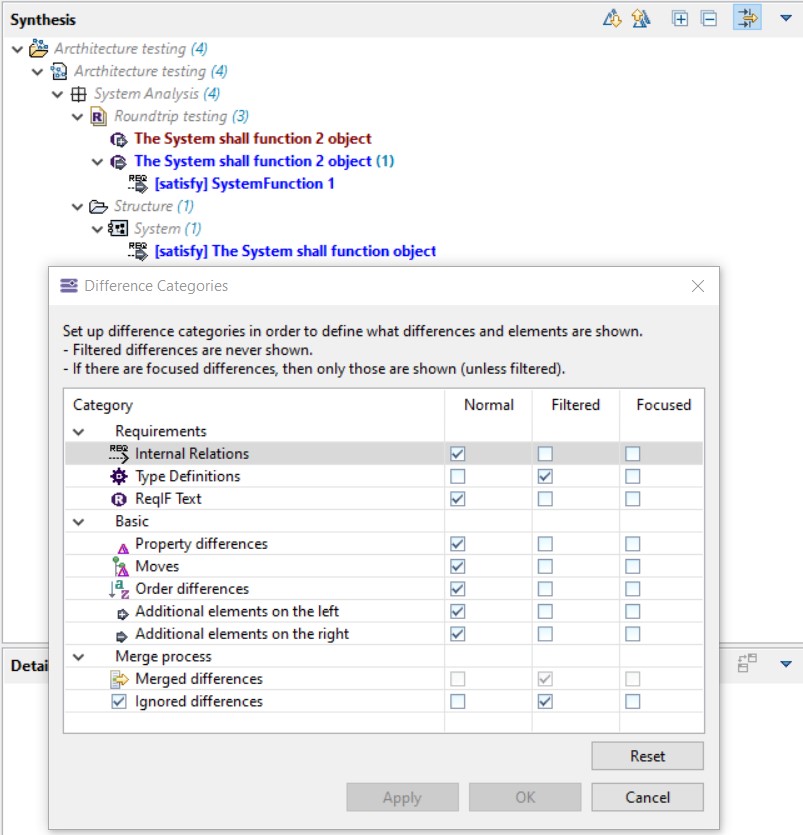
We can right-click over the requirements relationship and “ignore changes”, however, this may come a huge task if the number of requirements exponentially grow.
Any suggestions or options to tackle this question?
Thanks,
Hélder Castro