Dear all,
We are trying to automate our Capella exports in the context of a CI/CD pipeline. For that, I’m making a docker image which runs HTML exports, based on materpillar’s Capella-HTML-exporter.
It works fine on the surface, but the problem is that the Functional Scenarios get poorly rendered (see pictures). The original diagrams are horizontal arrows towards green boxes, and in the exported version, the arrows are all over the place instead of horizontal. The green boxes seem to be in the good positions.

Rendered (faultive)
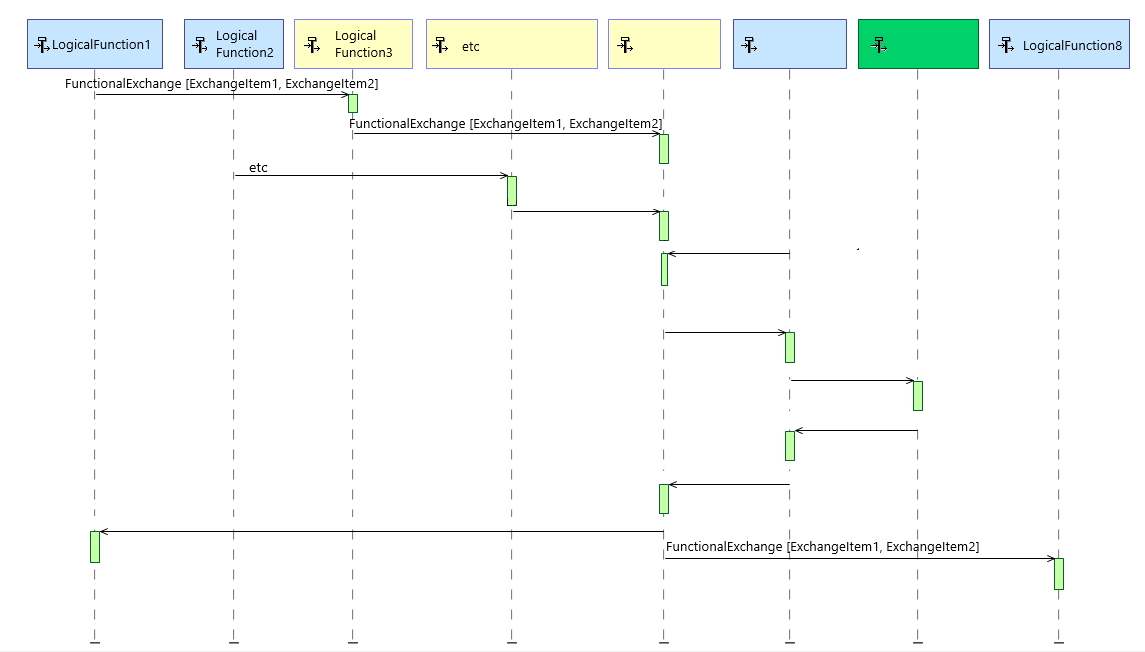
Supposed to be
Note that I’ve obfuscated and replaced the names (LogicalFunctions, FunctionalExchanges and ExchangeItems) by generic lables for privacy reasons.
Do you know how this comes about and how to work around this? It might be related to this issue: Logical Architecture Diagram Component Rendering Issue
The issue is seen with both Capella 6.1.0 and Capella 7.0.1 (on the Docker/Linux environment with CLI operation). When manually exporting (via GUI) on Windows, the issue is there sometimes with Capella 6.1.0 but not on 7.0.1.
The Dockerfile and entrypoint scripts are quite standard, with minor variations from materpillar:
FROM ubuntu:22.04

ARG DEBIAN_FRONTEND=noninteractive
RUN apt-get update -qq && apt-get install -qq \
    wget unzip libgtk-3-dev xvfb dbus-x11 && \
    rm -rf /var/lib/apt/lists/*

# This x11 stuff we apparently don't need:
#RUN apt-get install -qq x11vnc x11-xkb-utils xfonts-100dpi xfonts-75dpi xfonts-scalable xfonts-cyrillic x11-apps

ARG CAPELLA_VER=7.0.1
ARG CAPELLA_TAR=https://download.eclipse.org/capella/core/products/releases/7.0.1/capella-7.0.1.202503211540-linux-gtk-x86_64.tar.gz
ARG HTML_EX_ZIP=https://download.eclipse.org/capella/addons/xhtmldocgen/dropins/releases/7.0.1/CapellaXHTMLDocGen-dropins-7.0.1.202412031342.zip

RUN mkdir -p /opt/capella-${CAPELLA_VER} && \
    cd /opt/capella-${CAPELLA_VER} && \
    wget -nv -c ${CAPELLA_TAR} -O capella.tar.gz && \
    tar -xzf capella.tar.gz && \
    rm capella.tar.gz

RUN mkdir -p /opt/capella-${CAPELLA_VER}/capella/dropins && \
    cd /opt/capella-${CAPELLA_VER}/capella/dropins && \
    wget -nv -c ${HTML_EX_ZIP} -O capella-html-export.zip && \
    unzip capella-html-export.zip && \
    rm capella-html-export.zip

ENV PATH="/opt/capella-${CAPELLA_VER}/capella/:${PATH}"

WORKDIR /workdir
ENTRYPOINT ["./entrypoint.sh"]
Dockerfile
#!/bin/bash

# The first commandline argument contains the folder which shall have the outputs
MODEL_NAME=${1}
MODEL_FOLDER=${2:-${MODEL_NAME}}
RESULTS_FOLDER=${3:-/workdir/export}
mkdir -p ${RESULTS_FOLDER}

echo "MODEL_NAME: ${MODEL_NAME}"
echo "MODEL_FOLDER: ${MODEL_FOLDER}"
echo "RESULTS_FOLDER: ${RESULTS_FOLDER}"

# Import the Capella project into the workspace and export the model as HTML
# --- this was the original HTML export command; since exporting images gives same issue,
# command below is run instead (faster, representative of the issue)
# xvfb-run -s "-screen 0 1920x1080x24" \
# capella -nosplash -consoleLog \
# -application org.polarsys.capella.core.commandline.core \
# -appid org.polarsys.kitalpha.doc.gen.business.capella.commandline \
# -data /tmp/capella-workspace \
# -import "$(pwd)/${MODEL_FOLDER}" \
# -input "/${MODEL_NAME}/${MODEL_NAME}.aird" \
# -outputfolder "/${MODEL_NAME}/html" \
# -logfile "${RESULTS_FOLDER}/log_html.html" \
# -forceoutputfoldercreation

# Copy the HTML output and the validation results to the ${RESULTS_FOLDER}/ that
# is mapped as a volume to this container
# mv "${MODEL_FOLDER}/html" ${RESULTS_FOLDER}/html

# Images export only
xvfb-run -s "-screen 0 1920x1080x24" \
capella -nosplash -consoleLog \
-application org.polarsys.capella.core.commandline.core \
-appid org.polarsys.capella.exportRepresentations \
-data /tmp/capella-workspace \
-import "$(pwd)/${MODEL_FOLDER}" \
-input "/${MODEL_NAME}/${MODEL_NAME}.aird" \
-outputfolder "/${MODEL_NAME}/img" \
-logfile "${RESULTS_FOLDER}/log_img.html" \
-forceoutputfoldercreation
mv "${MODEL_FOLDER}/img" ${RESULTS_FOLDER}/img
entrypoint.sh
I’ve tried everything from updating Capella version to latest (7.0.1, as above), using -dpi 96 setting on the Xvfb and other resolutions (both smaller and bigger, from 800x600x24 to 3840x2160x24). Any help would be appreciated!
