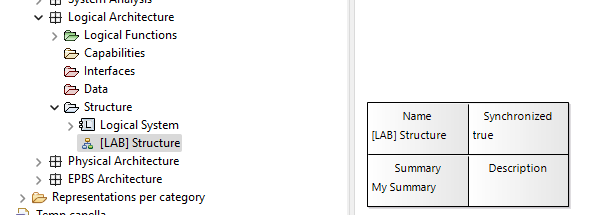
The Title Block contains:
- Name: feature:name
- Last change date: aql:self.getLastModificationDate()
- Summary: aql:self.target.summary
- Description: feature:documentation
The Name and Description can be added and modified in the Properties tab for the representation. The last change date is automatic.
But how do you enter a summary? And how is it different from a Description? For me, the summary field is always blank.
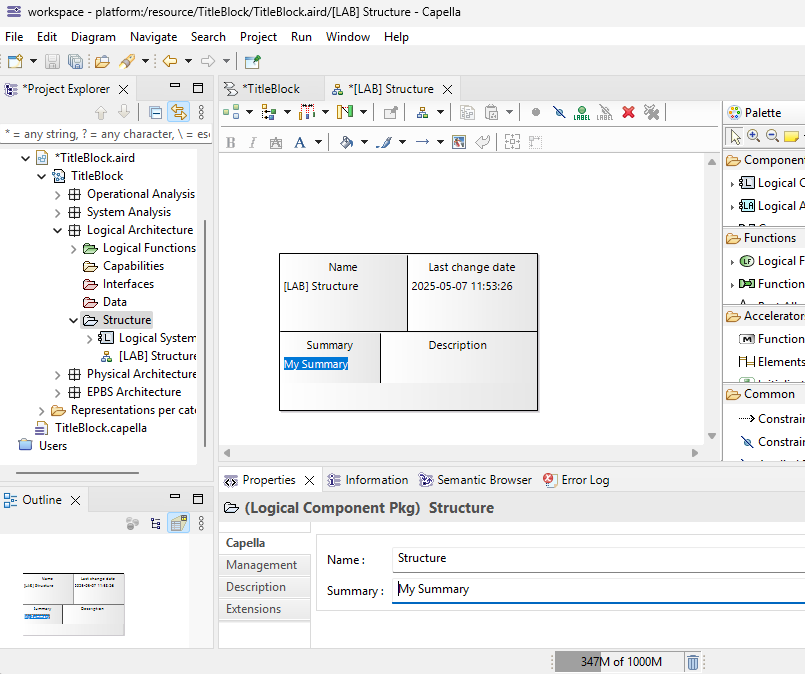
Summary is a property you have on Capella model elements. The expression “aql:self.target.summary” will go first to the target of the diagram (self.target) which is the element containing the diagram. For example, if you created a LAB using the method browser, then your diagram will be but default stored under the Structure" folder. So select the Structure folder and enter a summary, and you’ll see it appearing in the title block.
More importantly, these AQL expressions are to be customized with what you want to see in these title blocks.
I hope this helps.
Stephane Lacrampe
Obeo Canada
Can you please explain in more detail how to enter the Summary in the Structure folder. I don’t see where to enter the Summary or Description.
Thanks!
Yes, Select the Structure folder and you’ll see the summary field in the Properties view:
1 Like