Hi all,
I’ve run into a blocking issue with Capella that I can’t resolve and would appreciate your help.
When I create a new Capella project, everything looks fine — the System Engineering model is present, and I can see and edit elements (e.g., Operational Analysis, actors, capabilities, etc.).
However, after closing and reopening Capella, the project loads but the System Engineering element is completely missing from the project tree. I can no longer access or modify anything via the Capella GUl. But my Python4Capella scripts does not fail to get get_system_engineering(). Despite not failing, that is, the code is exceuted and I get the prints on the console confirming so, I can’t see if the elements were actually created or not as I can’t access the right file.
This happens even if I don’t run any scripts, and even when creating a new project directly from Capella’s UI. It’s as if the model root is being lost or not saved at all.
What I’ve tried:
- Creating a fresh workspace.
- Deleting and recreating the project entirely.
- Ensuring I always save (
Ctrl+S) before closing Capella. - Avoiding any Python or external edits during the test.
None of these helped — the project looks fine initially, then becomes unusable after restart.
Has anyone experienced something similar or know what could be causing this? Is there a setting, plugin, or workspace issue that might explain the disappearance of the System Engineering model?
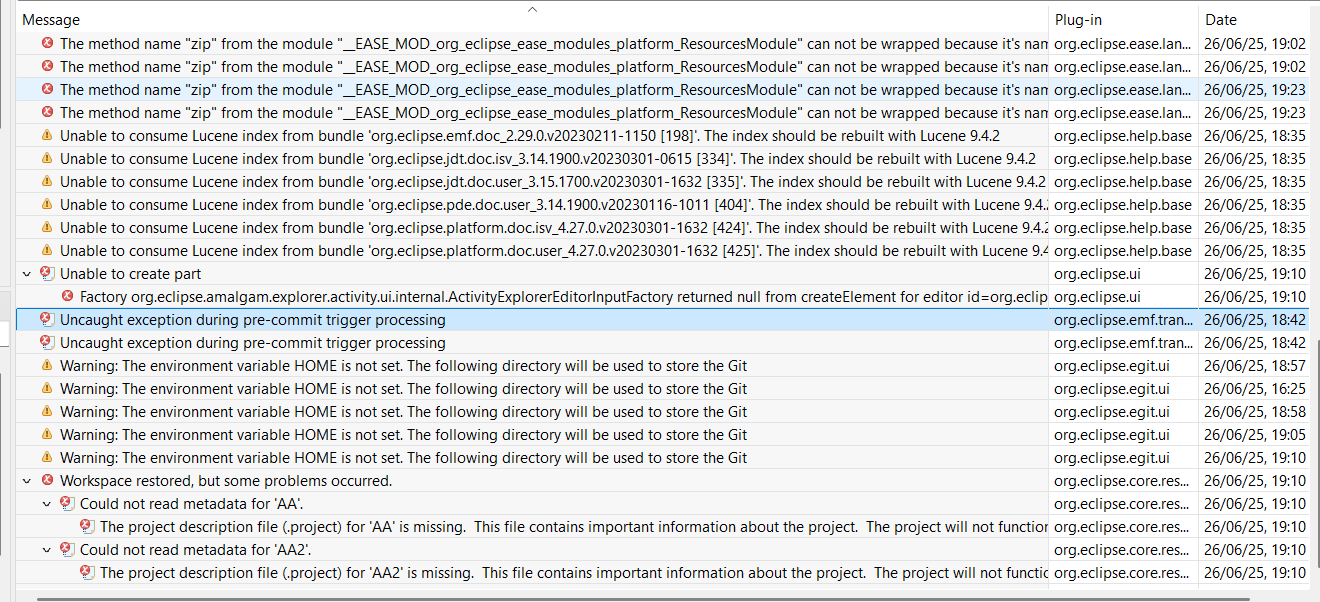
Additionally, I saw that someone has had a similar problem and I tried to follow the solution provided, but haven’t been able to work it out. Nonetheless, in order to solve that porblem the error log was requested so I will include a photo of it, hoping it might facilitate the resolution.
Thanks a lot in advance for any pointers.