Hi,
I’m trying to write a script to import some Capella elements from one model to another by first exporting it to excel and then importing it again. To import I start the script with model.start_transaction(), and after I have imported my elements I finish the script with model.commit_transaction() and model.save(). The elements I add in two ways, for example with the components I add it to the model with these two lines
lc_pkg.get_owned_logical_components().add(component) org.polarsys.capella.core.model.helpers.CapellaElementExt.creationService(component.get_java_object())
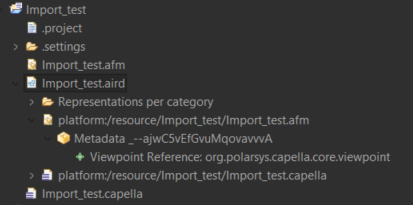
The elements then are successfully added to the new model and I can use them in diagrams. However, when I close Capella to later open it again the imported model glitches and I cant see my diagrams anymore as it seems as the system engineering file under the .aird file disappears, as can be seen in the image below and the platform:/resource/Import_test/Import_test.afm appears. Does someone know how to properly save the model, in order for it to keep saved and intact after closing Capella and opening it again later?
Your code seems good.
Do you have any errors in the error log after running your script ? or when closing the Capella session ?
If you have referenced element that are not in the model containment tree (owned* references), you will not be able to save the model. An example of this situation could be allocating functions to components but not adding the functions to the function package.

This error pops up twice in the error log after running the script. But no errors show when closing the Capella session. I also reference functions to the components but those seem to work at least in diagrams that I can use the allocated functions element in a diagram for both actors and components. The functions also turn blue for the logical functions allocated to logical actors after running this linking script. However, the project does not save correctly even after only importing the logical components and nothing else so I don’t think it relates to the saving issue
The zip error is not related.
Can you try this script (it creates new PhysicalComponent) with the IFE sample project ? is the project saved properly ?
If I run that script the project is saved properly. But when I run my own script it does not save properly. I have added my import logical system script below and similar to the create new physical component script it used the model.start_transaction(), model.commit_transaction(), and model.save() and I do not see the difference in how it is being saved.
# include needed for the Capella modeller API
include('workspace://Python4Capella/simplified_api/capella.py')
if False:
    from simplified_api.capella import *

# include needed for utilities
include('workspace://Python4Capella/utilities/CapellaPlatform.py')
if False:
    from utilities.CapellaPlatform import *

# include needed to read/write xlsx files
from openpyxl import *

#Path names
aird_path = "/Import_test/Import_test.aird"
xlsx_path = "/DVS/results/DVS_Logical_System.xlsx"
# aird_path = "/Import_test_IFES/Import_test_IFES.aird"
# xlsx_path = "/In-Flight Entertainment System/results/In-Flight Entertainment System_Logical_System.xlsx"


model = CapellaModel()
model.open(aird_path)

# gets the SystemEngineering
se = model.get_system_engineering()
lc_pkg = se.get_logical_architecture().get_logical_component_pkg()

# create  a folder in the project
xlsx_file = CapellaPlatform.getWorkspaceFile(xlsx_path)
xlsx_file_name = CapellaPlatform.getAbsolutePath(xlsx_file)

print("Read " + xlsx_file_name)

# load the workbook
wb = load_workbook(xlsx_file_name)

# grab the active worksheet
ws = wb.active

def find_component_by_id(components, component_id):
    """Find a component by its ID in a list of components."""
    for component in components:
        try:
            if component.get_id() == component_id:
                return component
        except AttributeError:
            if component.get_java_object().getId() == component_id:
                return component
    return None

def get_component_by_id(java_object, component_id):
    """Find a component by its ID in the children of a Java object."""
    for child in java_object.getOwnedLogicalComponents():
        if child.getId() == component_id:
            return child
    return None

#Start the import
model.start_transaction()

try:
    # Determine the maximum depth from the Excel file
    max_col = ws.max_column
    max_depth = max_col // 3
    print(f"Maximum depth detected from Excel: {max_depth}")

    # Create a list to keep track of parent components at each level
    parent_components = [None] * max_depth

    for row in ws.iter_rows(min_row=2):
        # Create a list of component data for each level
        components = []
        for level in range(max_depth):
            col = level * 3
            component_id = row[col].value if row[col].value else None
            component_name = row[col + 1].value if col + 1 < len(row) and row[col + 1].value else None
            component_type = row[col + 2].value if col + 2 < len(row) and row[col + 2].value else None
            components.append((component_id, component_name, component_type))

        # Import the hierarchy
        for level in range(max_depth):
            component_id, component_name, component_type = components[level]

            if not component_id:
                continue  # Skip empty entries

            if level == 0:
                # Top level component
                existing_component = find_component_by_id(lc_pkg.get_owned_logical_components(), component_id)
                if existing_component is None:
                    print(f"Creating new top-level component: {component_name} with ID: {component_id} as {component_type}")
                    if component_type == "Actor":
                        component = LogicalActor()
                    else:
                        component = LogicalComponent()
                    lc_pkg.get_owned_logical_components().add(component)
                    org.polarsys.capella.core.model.helpers.CapellaElementExt.creationService(component.get_java_object())
                    component.set_name(component_name)
                    component.get_java_object().setId(component_id)
                else:
                    component = existing_component
                    print(f"Top-level component: {component_name} with ID: {component_id} already exists in the model.")
            else:
                # Child component
                parent_component = parent_components[level - 1]
                if parent_component is None:
                    print(f"Parent component not found for {component_name} at level {level}")
                    continue

                java_parent = parent_component.get_java_object()
                existing_component = get_component_by_id(java_parent, component_id)

                if existing_component is None:
                    print(f"Creating new component: {component_name} with ID: {component_id} under {parent_component.get_name()} as {component_type}")
                    if component_type == "Actor":
                        component = LogicalActor()
                    else:
                        component = LogicalComponent()
                    java_parent.getOwnedLogicalComponents().add(component.get_java_object())
                    org.polarsys.capella.core.model.helpers.CapellaElementExt.creationService(component.get_java_object())
                    component.set_name(component_name)
                    component.get_java_object().setId(component_id)
                else:
                    if component_type == "Actor":
                        component = LogicalActor(existing_component)
                    else:
                        component = LogicalComponent(existing_component)
                    print(f"Component {component_name} with ID: {component_id} already exists under {parent_component.get_name()}")

            parent_components[level] = component

except Exception as e:
    print("Error: " + e)
    model.rollback_transaction()
    raise

else:
    model.commit_transaction()

# At the end of your script, after the transaction is committed
model.save()
print("Model saved")
I don’t see anything obvious in the script regarding containment and you don’t seem to make any cross-references…
Are you using Team for Capella with some objects locked by others ?
Hi,
I am not using Team for Capella so I don’t think that is causing the issue
You should probably simplify your script and try to save the model (for instance add only one component). Then add complexity until saving the model fails. It might give us an hint on what is going wrong.
It starts going wrong as soon as I set the ID of the component or actor. I can import the complete hierarchy of the system without issues but when setting the ID it fails after closing the project. I’m using this to save the ID:
component.get_java_object().setId(component_id)
I want to be able to set the ID with code as later on I want to look through the projects content by ID to allocate the correct functions to the correct components/actors and as some items have the same name I want to do this by ID as that is unique for everything even if the name is the same.
IDs are generated by Capella when creating an element. But I think it can be setted by hand… Can you check if you don’t have duplicated IDs ? This could be an issue.
If it’s not the case, you can create a dictionary of your ID to the Capella ID when adding your components. Then you can reuse this dictionary to allocate your functions.
I checked my IDs and there are no duplicates. I also tried it with the python API set_id(component_id) but that also resulted in the saving issue. I saw in the API also a get/set_sid(), I don’t know what the difference is compared to the get/set_id() but if I use set_sid(component_id) I can save the import and use that to then allocate functions to my imported systems by looking for the id via sid.
1 Like