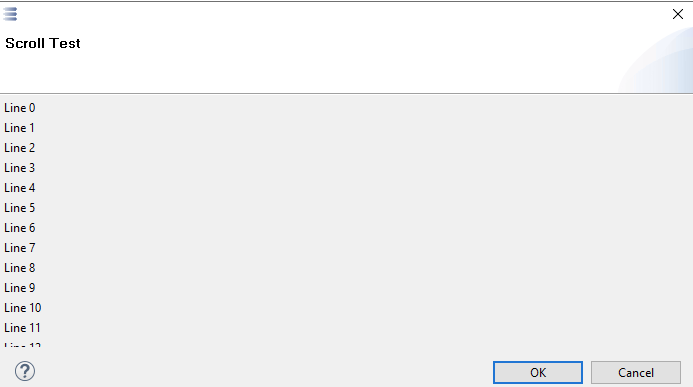
I’m working with Python4Capella scripts and have encountered a script termination issue.
Setup:
Capella 1.4.2
Python4Capella 1.1
using ‘loadModule(‘/System/UI’)’ and loadModule(‘/System/UI Builder’)
Issue:
I’ve created custom dialogs with action buttons. The dialogs work correctly - they display, buttons execute call-backs, and dialogs close properly. However, after the script completes execution, the red “running” indicator in Capella’s toolbar remains active. I have to manually click the STOP button to fully terminate the script. Even then the scripts doesn’t terminate.
Questions:
Is this expected behavior when using UI dialogs in P4C scripts?
Is there a proper way to ensure the script terminates cleanly after using UI dialogs?
The script functionality works correctly (all processing completes), but the execution indicator doesn’t stop, I have tried ‘sys.exit(0)’ but didn’t help me.
I think for dialogs the process should terminate when the dialog is closed, but for views, the script will run while the view is open. You can check the end of the view section of the tips and tricks for a snippet of code to close the view programmatically.
And yes, the context of execution in EASE is a bit different form a classic Python execution. That’s why the sys.exit(0) call doesn’t work. Here the script has code running in the Java display thread.
Let me know if you still have trouble terminating your script. Also if you can post a sample of your script with the same issue, I might be able to find a solution.
Thank you for clarifying. I’m using dialogs (createDialog), not views. However, the script still doesn’t terminate automatically.
Here’s my dialog implementation pattern:
class MyDialog:
    """Dialog with multiple action buttons for user choices"""

    def __init__(self):
        self.user_choice = None

    def build(self):
        self.label = createLabel("Select an option:", "1/1 o!")

        self.btn1 = createButton("Option 1", "dialog_instance.on_option1()", "1/2 o!")


        self.btn2 = createButton("Option 2", "dialog_instance.on_option2()", "1/3 o!")

    def on_option1(self):
        self.user_choice = 'option1'
        try:
            javaDialog.close()
        except:
            pass

    def on_option2(self):
        self.user_choice = 'option2'
        try:
            javaDialog.close()
        except:
            pass

# Show dialog
current_module = sys.modules[__name__]
current_module.dialog_instance = MyDialog()
current_module.javaDialog = createDialog("dialog_instance.build()", "Title", "Subtitle")

result = executeUI("javaDialog.open()")
choice = current_module.dialog_instance.user_choice

# Cleanup
try:
    del current_module.dialog_instance
    del current_module.javaDialog
except:
    pass

print(f"Choice: {choice}")
print("Script complete")
sys.exit(0)
Is there proper clean-up I’m missing?
I also have scenarios with multiple sequential dialogs, and dialogs where buttons toggle state (multiple clicks before closing). Could these patterns cause termination behavior?
I think you need to use the existing dialog buttons. The following script is different from yours but should give you an idea on how to implement yours:
class MyDialog:
    optionCombo = None

    def build(self):
        self.optionCombo = createComboViewer([ "option1", "option2", "option3" ])

    def evaluate(self, javaDialog):
        print(str(javaDialog.getData(self.optionCombo)))


instance = MyDialog()

javaDialog = createDialog("instance.build()", "Choose an option", "Select your option:");
result = executeUI("javaDialog.open()");
if result == 0:
    instance.evaluate(javaDialog)
else:
    print("Dialog cancelled")
But I don’t really understand why closing the dialog is not enough in your code…
Thank you for the example. I understand the standard pattern with OK/Cancel buttons.
However, my scripts have multiple dialogs using custom action buttons (immediate action on button click, like ‘Skip’, ‘Export’, ‘Abort’). My dialog boxes don’t use the OK/Cancel options; instead, they function based on clicks of the custom buttons which I have implemented. I also have scenarios where a dialog box accepts multiple user selections. These dialogs use toggle buttons that function like checkboxes - users can click multiple buttons to select options, and the dialog remains open until they complete their selections. My script then processes data based on these choices.
You mentioned you don’t understand why closing the dialog programmatically isn’t enough. Could this be a limitation or bug in EASE when custom buttons call javaDialog.close(), or does the usage of custom buttons lead to the script not terminating?
Is there any way to make custom action buttons (that close the dialog in their callbacks) work with proper script termination? Or is the only solution to redesign all dialogs to use input widgets with OK/Cancel?
Is there any documentation(s) where I can find all the capabilities of UI integration (like checkboxes, radio buttons etc) in Python for Capella which I can refer to, and maybe alter my solution?
I think the problem is on the Java side. For instant the Shell (widow allocated by the window manager) might not be disposed, but I tried to close it without any success.
You could try to create a view instead of a dialog… You can list all EASE modules with the Module Explorer view.
Thanks for the solution @YvanLussaud I have gone through the resources and for my requirement createDialog works good. However I faced another limitation, and thought of checking if there is a worthy solution.
The size of the dialog box varies in different machines, in some machines, the dialog box appears properly and all the content inside it is visible clearly, but for machines like that support Windows 11, the dialog renders too small and the buttons are cut off.
The problem probably comes from the version of SWT that might not be up to date for Windows 11…
You can try two things:
pack the container, it is probably done already but you can give it a try:
executeUI("javaDialog.getContainer().pack()")
only change the initial size:
executeUI("javaDialog.setInitialSize(500, 800)")
For the scroll bar I don’t know how you could do this from Python for Capella… You still have the possibility to create your dialog in a Java class and export it in an EASE module but that defeat the goal of using Python for Capella in the first place…
setInitialSize works well and is cleaner than my previous approach. getcontainer().pack() also works after create() is called, though in my case it has no visible effect since we are already setting a fixed size.
For implementing scrollbar - is there any way to wrap getContainer() in a ScrolledComposite via executeUI or is that simply not accessible from the EASE scripting layer?
Thank you for the feedback. I don’t think you will be able to change the dialog from outside. The Composite, returned by getContainer() is a Scrollable but I think it’s only possible to enable scroll bars by passing the style in its constructor Composite(parent, ... | SWT.H_SCROLL | SWT.V_SCROLL ). Once it’s created I don’t think it can be changed.