Hello,
I completed a diagram (e.g. LAB) that includes Component A. Later, elsewhere in the model, I added a new port to Component A. When I returned to the completed diagram, the new port appeared automatically. I would prefer that newly added ports remain hidden by default in existing completed diagrams.
Is there a setting to make new component ports and exchanges hidden by default in diagrams?
Thanks
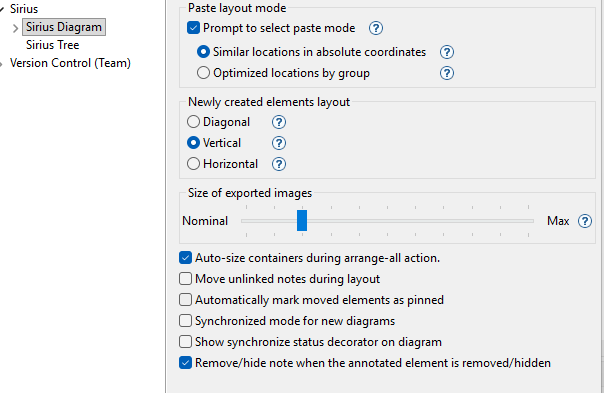
In the preference window, you can un-tick the “Synchronized mode for new diagrams” in the Sirius Diagram properties. This will work only for new diagrams, you would have to make your existing diagrams un-synchronized manually (right-click in the background of each diagram).
1 Like
Thank you.
Is there a way to enable this option on specific diagrams rather than all the future new diagrams I’ll create?
Yes, right-click in the background of your diagram and choose “Unsynchronized” (or something like that)