Hi all,
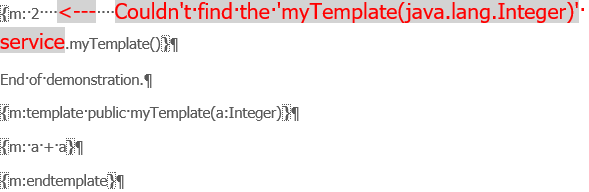
I’m struggling to use M2Doc templates, on basis of provided examples, but no way. I systematically encounter the “Couldn’t find the ‘xxx’ service” message when validating the template file, at template call level, whatever the Capella/M2Doc used versions (4.5.2/5.2 for Capella, 3.2.0/3.2.1 for M2Doc)
Has someone any idea about the cause/solution?
Many thanks,
Stéphane
You need to install the update site provided on this page using p2 (as described on the page), don’t use droppings.
Hello,
Thanks for the quick answer
I’ve tried the described way but encounter an “HTTP Proxy Authentication Required” error message
So, there’s no way to install M2DOC through the zip download?
I think the zip should contains everything… Maybe you need to uncheck the Contact all update sites ... checkbox.
Alternatively you can configure Eclipse to use your proxy, with the menu Window/Preferences…:
I’ve tried again using the zip and encounter this error message:
“Cannot complete the install because one or more required items could not be found.
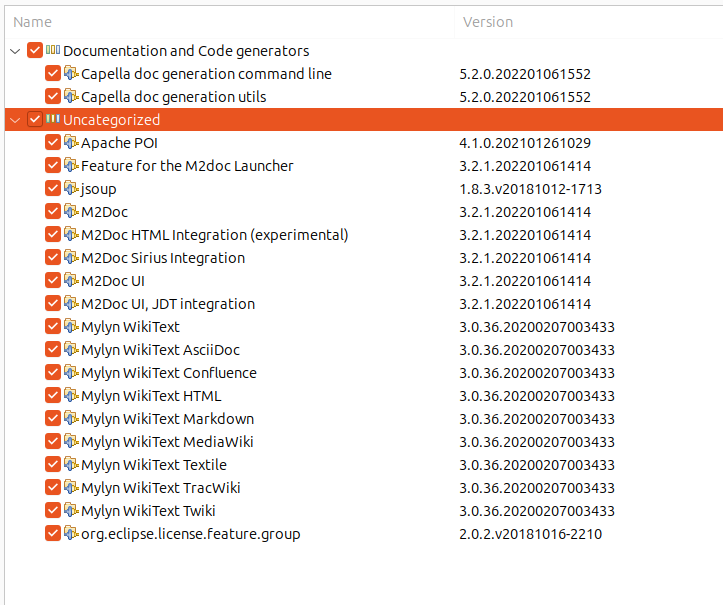
Software being installed: Capella doc generation command line 5.2.0.202201061552 (org.obeonetwork.capella.m2doc.commandline.feature.feature.group 5.2.0.202201061552)
Missing requirement: Capella M2Doc Commandline 5.2.0.202201061552 (org.obeonetwork.capella.m2doc.commandline 5.2.0.202201061552) requires ‘osgi.bundle; org.polarsys.capella.core.commandline.core [5.2.0,5.2.1)’ but it could not be found
Cannot satisfy dependency:
From: Capella doc generation command line 5.2.0.202201061552 (org.obeonetwork.capella.m2doc.commandline.feature.feature.group 5.2.0.202201061552)
To: org.eclipse.equinox.p2.iu; org.obeonetwork.capella.m2doc.commandline [5.2.0.202201061552,5.2.0.202201061552]”
About my last post, my bad: Using 2 versions of Capella (4.5.2/5.2), I mixed up 2 versions of M2DOC, 3.2.0 and 3.2.1 during installation. So, the error message of my last post is normal
To summarise, installation done using the downloaded zip of M2DOC install for the 2 versions of Capella (4.5.2/5.2) and same error message when trying to call a template (“Couldn’t find the ‘xxx’ service“)
I’m behind a professional proxy, and can’t provide authentication
Moreover, I’ve tried the same installation from home, on my personnal laptop, whith the same error message when using templates. I did not try direct installation from the update site
The plugin org.polarsys.capella.core.commandline.core in version 5.2.0 is already installed if you are installing the M2Doc Capella extension on Capella 5.2.0.
If you need Capella 5.2.0, you can download it here and then use this zip file.
I just did the install without any issue:
Both installations (Capella 4.5.2/5.2 - M2Doc 3.2.0/3.2.1) through downloaded zip files went right, without any error message
And in both cases, same behaviour when calling a template: “Couldn’t find the xxx service”
Could the installation result depend on installation way, downloaded zip or update site?
I imported the sample IFE project with the M2Doc templates from the examples. Then launched the generation using .genconf files for both SA and LA without any errors…
The only thing I can think of is if you are a Windows use, you should install your Capella near the root of your file system because path longer than 256 chars can prevent some plugins from loading.
If you are using your own template, you need to import the Java class containing the service method first. To do so, you can use the template properties wizard and the services tab.
1 Like
Hello,
And thanks again
I tried also the IFE project, without any problem. But the fact is that the IFE project documentation templates do not contain any “m:template”, as far I remember
I did not understand your remark about importing a Java class. I’m trying to use templates defined in the generation template file (through “m:template” declaration)
The Capella installation path length is 35 characters
OK I understand ! So template (the document) and template construct (m:template)… The naming should have been module instead of template and template for template construct but now I think it’s better to keep it that way to avoid confusion (at least try)…
The template construct needs to have at least one parameter. The first parameter is the receiver and denote the part of the AQL expression before the call to the template. And as any service if the first parameter is a collection you need to use the operator -> instead of . to call your template construct.
You can find working example in the unit tests (please replace the master branch by your version of M2Doc):
Ok, we are now speaking about the same thing
So, I already tried the provided examples, and got the error message:
I created a project in my previous installation and imported the nominal test. Launched the validation and generation without any issue…
I see you have the visibility public in your template, but visibility has been introduced after version 3.2.1 (probably 4.0.0). Can you remove the visibility and try again ?
You got it!!!
After removal of the public visibility from the template declaration everything went right
Many thanks for the help
1 Like