Fixing Broken RPL to REC Link

I’ve been playing around with using REC and RPL to facilitate architecture reuse. I have one library called my “Capability Library”. This library has a REC. I have referenced this library in a project, and instantiated an RPL from this REC.

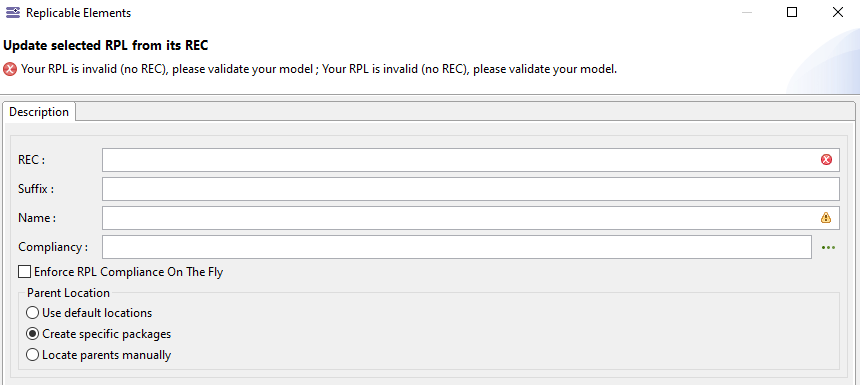
Seemingly randomly, that library disappeared from my project. The RPL still exists, but the library was no longer referenced and the RPL wasn’t linked to an REC anymore. I re-referenced the library and I attempted to right click the broken RPL and select “Update Selected RPL from its REC”, but I get the error shown below… I was hoping I would be able to re-build this link but I can’t figure out how. Does anyone have any guidance? I’m worried I’ll need to remove all of the RPL objects and re-connect it / recreate all of my diagrams.

Hello,

Could you please give more information ?
When you lost the reference to the Library, does the “REC catalog” disapear too or not ?

I make a little try with basic a basic project, and a basic library witj only one function. I instanciate a RPL in the project who referenced the library.
And when i dereferenced the library the warning is not the same, and if i re-referecence the library, the update work, so you should have an other problem.

The REC/RPL are managed in the .capella file.

In my example, when i instanciate a RPL of my REC the following text has been added :

<ownedElements xsi:type="re:CatalogElement" id="cf796650-750d-4dc9-a4f8-37e8ed39eea5"
          name="PF_LibRec_REPL" kind="RPL" suffix="_REPL" origin="re:CatalogElement ../TestLibRec/TestLibRec.capella#6c604bd9-081b-4c2b-9176-e50725567d75"
          currentCompliancy="re:CompliancyDefinition ../TestLibRec/TestLibRec.capella#443e04a5-48cd-447e-b028-fe85d85bccc1"
          defaultReplicaCompliancy="re:CompliancyDefinition ../TestLibRec/TestLibRec.capella#443e04a5-48cd-447e-b028-fe85d85bccc1">
        <ownedLinks xsi:type="re:CatalogElementLink" id="ec593952-13e1-4f52-b0f5-d4700a00de5f"
            source="#cf796650-750d-4dc9-a4f8-37e8ed39eea5" target="#83443d6d-cc91-4a78-b16c-29dd252f61d4"
            origin="re:CatalogElementLink ../TestLibRec/TestLibRec.capella#5ad78926-b331-41e9-9e34-43db1b41168c"/>
      </ownedElements>

Has you can see, my RPL has references to the REC of the library.
The .capella of the library llok like this :

<ownedExtensions xsi:type="re:RecCatalog" id="de8bc0a6-e9df-401c-b917-90646ab4b494"
        name="REC Catalog">
      <ownedElements xsi:type="re:CatalogElement" id="6c604bd9-081b-4c2b-9176-e50725567d75"
          name="PF_LibRec" defaultReplicaCompliancy="#443e04a5-48cd-447e-b028-fe85d85bccc1">
        <ownedLinks xsi:type="re:CatalogElementLink" id="5ad78926-b331-41e9-9e34-43db1b41168c"
            source="#6c604bd9-081b-4c2b-9176-e50725567d75" target="#edf81145-17cc-4ea3-8940-e943305b6c9b"/>
      </ownedElements>
      <ownedCompliancyDefinitionPkg xsi:type="re:CompliancyDefinitionPkg" id="696ed29c-295e-455f-9704-327b0de47b42"
          name="Compliancy Definitions">
        <ownedDefinitions xsi:type="re:CompliancyDefinition" id="443e04a5-48cd-447e-b028-fe85d85bccc1"
            name="BLACK_BOX"/>
        <ownedDefinitions xsi:type="re:CompliancyDefinition" id="405da573-542a-4810-b60f-76b373b76e82"
            name="CONSTRAINT_REUSE"/>
        <ownedDefinitions xsi:type="re:CompliancyDefinition" id="2622aaf9-ce07-430a-9a0a-1673c9c449fc"
            name="INHERITANCY_REUSE"/>
      </ownedCompliancyDefinitionPkg>
    </ownedExtensions>

The link between the file is easy to find here.

So in order to have a better idea of your problem, is it possible to show us a little more of your files ?

Sorry for the delayed response!

I ended up needing to move on pretty quickly and I needed to move some stuff to github anyway, so I took this as an opportunity to rebuild my analysis and store it in Github. In the process I wiped out the old files and don’t have a ton more to share.

Throughout the process of moving things to github I did find that the .aird and .capella files are pretty readable with things like notepad++ so if this comes up again I will definitely dig a bit deeper into the file structure itself to see if I can get more insight. I haven’t had a similar issue yet…