Hi all,
I would like to keep ordinary property values visible in the Project Explorer, but hide the PVMT-generated property value groups (the Domain::Extension Property Value Groups you see under each element). In my use case, I want to use them as metadata but the current implementation makes the tree hard to read.
Example with the IFE sample model below:
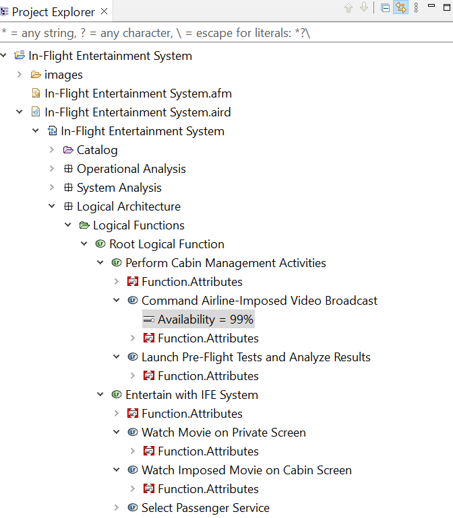
Function.AttributesPVGs are applied to all functions – Want to hide- Function
Command Airline-Imposed Video Broadcasthas a Property ValueAvailability = 99%- Want to show
What I have found so far:
Filters & Customization -> Pre-set filters: the ‘Property values’ checkbox hides every property value: PVMT and non-PVMT. Not ideal for my use case.Filters & Customization -> User filters: thought about using patterns such as*.AttributesorFunction.*To detect ‘PVMT’ but this feature only seems to work on files and folders. PVMT groups are model elements, so these patterns do nothing.
My questions are:
- Is there any built-in way to filter only PVMT property value groups from the Project Explorer?
- Has anyone already created a reusable filter for this?
- If not, could selective PVMT filtering be added as a future feature in Capella/PVMT?
Thanks
Jack