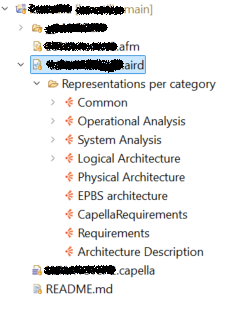
Good morning, I’m having a bit of trouble with Capella and was hoping someone might be able to help. When I opened the project manager window, not all elements are being displayed. I checked the filters, but they don’t seem to be hiding anything specific. I can still open the diagrams and see the elements, but the requirements aren’t showing up on the diagrams. Has anyone experienced this before or have any advice on how to resolve it?
That does not look good. Before doing anything, make sure you save your model in some other places or even better, that it was already saved.
It looks like your model got corrupted or something. Did you change anything or did any specific action?
In some cases I have seen this when:
Opening a Capella model that has been modified by someone with a different version of Capella or a different version of a Capella add-on or a Capella add-on missing in one environment
Modifying the model with Python4Capella scripts that introduces inconsistencies in the model
Stephane
Thanks for the prompt reply. The issue was that there were conflicts in the project due to Git, caused by a different Capella add-on, as you kindly suggested.