Hello community ,
I would like to know how are you dealing with the generated doc that contains HTML symbols ,
I have identified some of them in orther to be more clear about what im talking about :
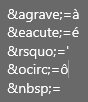
When it comes to generated frensh document , it’s more unreadable
Im wondring if there is a way to get the same text that i write or (Paste) in the description field.
Best regards
Youness EL HEJBANI
I didn’t had any tests on this HTML character entity reference, but I added one and it works, even the &ndsp;.
Thx Yvan for your reply
I don’t know if my question was clear
simply, i dont find the text that i put in description field when i generate my word file , it’s plenty of code (i think its like HTML code)
How i could find my txt properly when i generte my document
it dont matter (HTML OR SOMETHING ELSE) , i need to find my text that put in capella descriptionsas is it
Thx a lot
The description is saved as HTML in the EAttribute description, so you can access if with:
m:someCapellaObject.desciption
This will return the HTML code, if you want to insert the formatted text you can use:
m:someCapellaObject.desciption.fromHTMLBodyString()
1 Like
THX a lot Yvan , this is what i was looking for
Best regards
Youness
Hello,
I know this is an old topic, but I’m just getting started with M2Doc and encountered an issue.
When I try to use: m:someCapellaObject.description.fromHTMLBodyString()
it returns something like: org.obeonetwork.m2doc.element.impl.MParagraphImpl@139b88e0
instead of the expected formatted content.
Does anyone know what this means or how to properly render the description as text?
Thanks in advance!
Hi Filipe,
MParagraph is an internal representation of a paragraph for M2Doc (see MElement for more details). M2Doc will insert it as a Word paragraph in the generated document.
If you use the service directly in your own code you will need to write some code to extract the text and create needed paragraphs for instance. Please check the implementation of MElement.
1 Like
