I created an Excel file with elements of a physical architecture (Physical Node and Behavioral) that I would like to import into a new model (in order to start from an existing physical architecture).
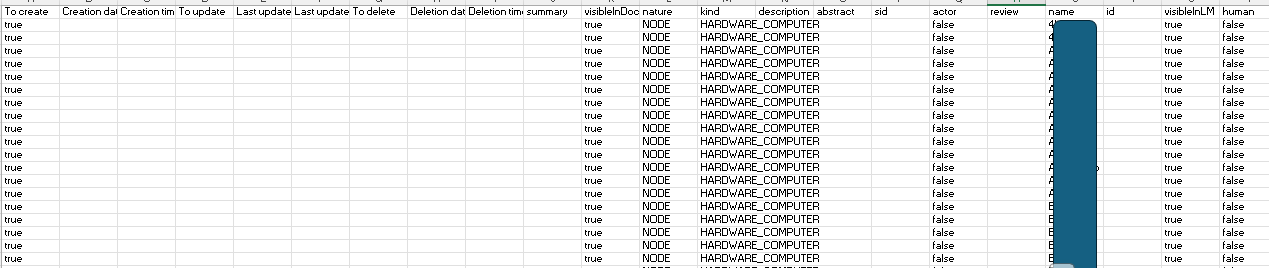
For each element (each Excel row), I filled in the columns as shown below.
Since I want to create a model from external data, I obviously don’t have a Capella ID to provide, so for each row in the ID column, I left it blank.
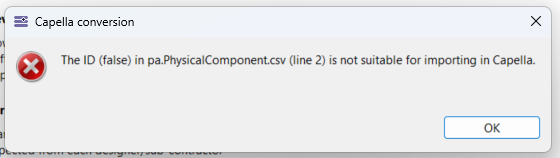
During the import (command “CSV to Capella”), I received the following message:
The csv-converter_1.1.0_capella_5.2.0 (for Capella 5.2.0) seems to working well with Capella 7.0.1. : I had a lot of usage since last November and I didn’t find issue with Capella 7.0.1 for different exports or inports (create or update data), but I didn’t tried all possible imports
But I found issue with filtering addon (version 1.7.0) : exports seem to work well, but inports doesn’t work at 100% (around one half of different csv files relative to filtering are really imported, for the other nothing append and without any error message)
Csv-converter usage isn’t difficult, it needs:
to develop script to automatize read and write csv files according what we want to do
and before to do some manual tests to define / understand which file / attribute we need to change.
Sometime it’s need to update several files on the same time for example to import Physical Nodes, we need to update both “cs.Part.csv” and “pa.PhysicalComponent.csv” (difficulties I had when I publish this topic last November)