Let me suggest another approach that gives you better control of attribute data types and what goes into the resulting ReqIF file. I’ve used ReqView, which has excellent Excel import and ReqIF export capabilities suited for Capella:
- Create a project in ReqView.
- Add custom attributes of appropriate types for everything in your Excel files. I’ve only added
origIDas astringbased on your example Excel file. - To import the Excel file, we need to modify it first:
- Rename column
IDtoorigID - Fill in the
levelcolumn based on the hierarchy - Create
headingandtextcolumns and fill one of them with contents ofLvl X Req– e.g. useheadingif it has descendants andtextotherwise - Delete the
Lvl X Reqcolumns - Save it as CSV UTF-8 file and then import into the ReqView document
- Rename column
- You should get something like this in ReqView:
- Export ReqIF to Capella, ensure Export for Capella MBSE is checked so that ForeignIDs are numeric and that a .properties file with all custom attribute names is generated
- You should get something like this in Capella:
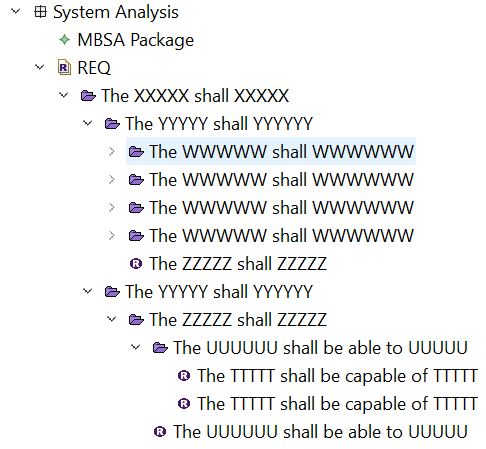

It might seem a bit complicated, but using this approach will allow iterative updates from CSV to ReqView as well as from ReqView to Capella using ReqIF – the internal identifiers of all objects are persisted. Once you import the stuff into ReqView, there’s not much point in using Excel anymore though.
Hope this helps, I’m attaching all the files involved.
Richard
reqif_testfile.reqif (32.1 KB)
reqif_testfile-reqview.csv (1.1 KB)
reqif_testfile-reqview.xlsx (10.1 KB)
reqview_prj.reqw (24.6 KB)